
Mithilfe von Custom CSS kannst du deine Umfrage perfekt an deine Brand und dein Corporate Design anpassen. Deine Umfragen können mit deiner eigene Schriftart sowie Sonderelementen deiner Marke angereichert werden.
In der Umfragenerstellung findest du das Custom CSS Feature ganz unten innerhalb des „Style“ Tabs:
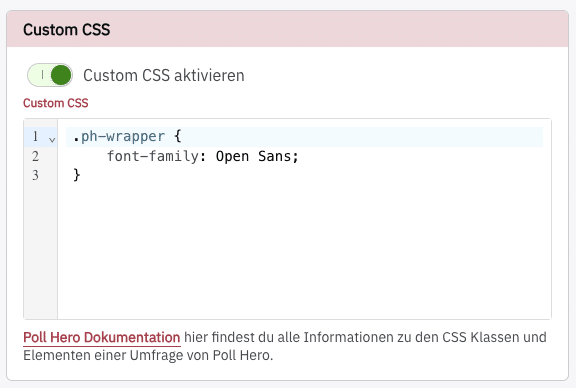
Wenn du die Schriftart deiner Webseite verwenden möchtest, kannst du einfach
* { font-family: inherit!important; }verwenden. Dann wird in der gesamten Umfrage die Schriftart deiner Webseite benutzt.
Layout & Container #
.ph-wrapper.ph-survey
works only for standalone survey which has no Shadow DOM
.ph-survey-host.ph-survey-host--full-image.ph-survey-host--side-image.ph-box-inner.ph-box-outer.ph-bg--left.ph-bg--main.ph-bg--right
works only for onsite survey
.ph-survey-minimized.ph-overlay
Header & Branding #
.ph-header.ph-header__branding.ph-header__close.ph-topbar.ph-topbar__back.ph-topbar__close.ph-topbar--close-only.ph-branding.ph-branding__logo.ph-branding__text.ph-title.ph-subtitle
Avatar #
.ph-avatar.ph-avatar__info.ph-avatar__name.ph-avatar__title
Fragen & Text #
.ph-question__body.ph-question__title.ph-question__description.ph-length-hint
Buttons #
.ph-btn--primary.ph-btn--secondary.ph-btn--action
works only for standalone survey
.ph-extra-btn.ph-extra-btn-container
Eingabefelder (Inputs) #
.ph-input--checkbox.ph-input--radio.ph-input--text-inline.ph-input--short (short free text).ph-input--long (long free text).ph-input--email
Antwort-Optionen (Standard) #
.ph-options.ph-option
Rating (Sterne, NPS, etc.) #
.ph-rating--large.ph-rating--small.ph-rating__elements.ph-rating__element.ph-rating__btn--star.ph-rating__btn--nps.ph-rating__btn--number.ph-rating__btn--full.ph-rating__context.ph-rating__label
Emoji #
.ph-emoji.ph-emoji__item
Matrix #
.ph-matrix.ph-matrix__container.ph-matrix__row
Dropdown #
.ph-dropdown__btn.ph-dropdown__answer.ph-dropdown__arrow.ph-dropdown__content.ph-dropdown__list
Ranking #
.ph-ranking.ph-ranking__item.ph-ranking__item--dragging.ph-ranking__item--drag-over.ph-ranking__drag-icon.ph-ranking__dropdown.ph-ranking__icon.ph-ranking__number.ph-ranking__number-block.ph-ranking__text
Fortschrittsbalken (Progress Bar) #
.ph-progress.ph-progress__track.ph-progress__fill.ph-progress__info.ph-progress__label.ph-progress__label-row.ph-process-bar.ph-process-bar__segment
Opt-in & Warnungen #
.ph-optin.ph-optin__label.ph-optin__notice
Warnungen #
.ph-warning (reached maximum allowed selections in a multi-select question ).ph-error (failing to answer a required question or entering an invalid email address)